How Windows Tablets for Veterinary Clinics Improve Workflow, Efficiency, and Patient Care
Veterinary clinics don’t lose productivity in one obvious way.
Instead, time slips away in small, repeated moments such as walking back to a workstation, re-entering notes later, or searching for information during a consultation.
Over time, what happens is these small inefficiencies build up and start to take up a noticeable chunk of time throughout the day.
So more clinics are turning to Windows tablets for veterinary workflows, a simple shift that can significantly improve the efficiency, communication, and overall clinic performance.
In this blog, we’ll explain why veterinary workflows often become inefficient, how mobile devices change that, and what practical benefits clinics can expect when using Windows tablets in day-to-day operations.
Full Blog: Why Veterinary Clinics Are Using Windows Tablets to Work More Efficiently
The Growing Administrative Burden in Veterinary Clinics
Modern veterinary work involves far more than just diagnosing and treating patients.
Alongside clinical care, teams are constantly managing records, updating treatment plans, communicating with clients, coordinating across staff, and ensuring everything is logged correctly for compliance and billing.
Administrative workload has been identified as a growing issue in the veterinary profession, with reports showing that documentation and non-clinical tasks are taking up a significant portion of time in practice.
The difficulty isn’t just the amount of work, but how it’s structured.
In many clinics, these tasks do not happen in one continuous flow. A clinician may complete an exam in one room, but the documentation is finished later at a workstation. A technician may assist with treatment in one area, but updates to the record happen somewhere else. A client discussion may pause because the estimate or image needed is not immediately available.
A common issue clinics run into is that the care happens in one place, but the information needed to support that care is stored or accessed somewhere else. That creates small interruptions throughout the day, which build up into delays, duplicated work, and end-of-day administrative backlog.
This is where workflow starts to break down.
A mobile approach changes that by bringing documentation, communication, and coordination into the same space as patient care.
Real-Time Documentation at the Point of Care
One of the most consistent inefficiencies in veterinary clinics is how notes are recorded.
Typically, the consultation happens first. The clinician gathers information, performs the exam, discusses findings, and decides on next steps. The actual record entry often happens afterward, sometimes between appointments or at the end of the day.
That gap creates two problems.
The first is time. Even a few minutes per consult adds up across a full schedule.
The second is accuracy. When notes are entered later, details can be missed, simplified, or mixed up with other cases.
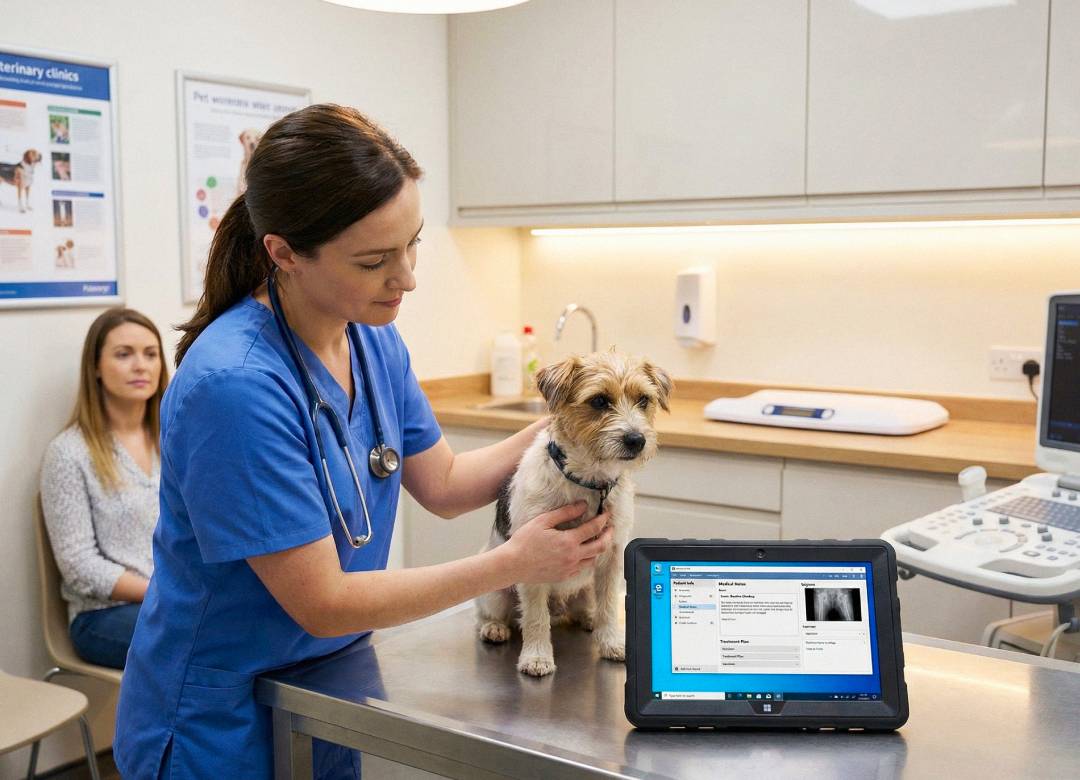
Using a Windows tablet allows documentation to happen while the appointment is still in progress or immediately after, without leaving the room.
This aligns with a broader shift toward in-room documentation and tools like digital scribing, which are being introduced to reduce admin workload and allow clinicians to focus more on patient interaction.
In practice, this means a clinician can update the record while speaking with the client, enter treatment details right after handling the patient, or dictate notes while moving between rooms. The record becomes part of the workflow instead of a separate task.
This changes how the day feels.
Instead of building up a backlog of notes to complete later, information is captured as it happens. That reduces pressure at the end of the day and improves the overall quality of the records.
Mobile Access Improves Team Coordination
Veterinary clinics depend heavily on coordination between team members.
Throughout the day, staff need to keep track of which treatments have been completed, which patients need attention, what medications have been administered, and what still needs to be done before discharge.
The issue is not that this information is missing.
The issue is that it’s often tied to a fixed location.
A common scenario in clinics is that a nurse or technician is moving between patients in the treatment area while needing to check or update information that is only available on a workstation. This means stopping what they are doing, walking away, checking the system, and then returning to continue the task.
That kind of movement may only take a minute each time, but repeated across dozens of interactions, it slows everything down.
With a Windows tablet, that information becomes portable.
Staff can check patient records, update treatment progress, and confirm details while standing next to the patient. This keeps the workflow continuous instead of fragmented.
It also improves team communication, because updates are made in real time rather than being delayed or passed along verbally.
Why Full Windows OS Is Critical for Veterinary Software
One of the biggest limitations of many mobile devices is that they rely on simplified versions of software.
In a veterinary setting, that can create problems.
Many clinics rely on full-featured systems for managing records, billing, scheduling, imaging, and treatment workflows. These systems are often designed for desktop environments, with multiple windows, detailed inputs, and full functionality.
Modern veterinary software platforms continue to emphasise browser-based and desktop-style systems as central to clinic operations, as seen with platforms like DaySmart Vet.
When those systems are accessed through limited mobile apps, the experience can become restricted. Features may be missing, workflows may be different, and staff may need to switch back to a desktop to complete certain tasks.
A Windows tablet avoids that issue.
Because it runs full Windows, it supports the same environment used on clinic workstations. That means staff are using the same system, with the same functionality, whether they are at a desk or in an exam room.
This consistency matters.
It reduces training time, avoids confusion, and allows the clinic to maintain one clear workflow instead of managing separate desktop and mobile processes.
Better Client Communication in the Exam Room
Client communication is a key part of veterinary care, but it is often interrupted by workflow limitations.
In many clinics, explaining a condition or treatment plan may involve stepping out of the room to retrieve information, print documents, or access images from another system.
That breaks the flow of the conversation.
It also creates small delays that make the appointment feel less connected.
With a Windows tablet, the information can stay in the room.
A clinician can show an X-ray directly to the client, zoom in on specific areas, explain findings clearly, and move straight into discussing treatment options. Estimates, instructions, and follow-up details can all be accessed without leaving the space.
This makes the interaction more direct.
Clients are able to see what is being explained, ask questions immediately, and make decisions without waiting for the next step in the process.
How Tablets Help Capture More Revenue
Revenue loss in veterinary clinics often comes from small gaps in recording activity.
A treatment is completed, but not logged immediately. A supply is used, but not entered into the system. A medication is administered, but the billing step is handled later and something is missed.
These aren’t major errors. They’re small disconnects between care and documentation. And over time, they add up.
A mobile workflow helps reduce this by keeping the record accessible at the moment the action happens.
When a clinician or technician has the system in front of them, it becomes easier to log treatments, update records, and ensure that everything is captured correctly.
This leads to more accurate billing, fewer missed charges, and smoother coordination between clinical staff and the front desk.
Hygiene and Durability in Veterinary Environments
Veterinary clinics are not controlled office environments.
Devices are used throughout the day, handled frequently, and exposed to conditions that include fur, fluids, and constant movement between rooms.
They also need to be cleaned regularly as part of infection control practices.
That means the device needs to be practical to maintain.
A tablet used in this setting should be easy to wipe down, simple to handle, and durable enough to cope with daily use. Lightweight design matters because the device is carried frequently, and reliability matters because interruptions to access can disrupt the workflow.
In this context, the device is not just a piece of technology. It becomes part of the working environment.
Best Windows Tablet for Veterinary Clinics: Fusion5 Rugged Pro N5
For veterinary clinics, the goal is not to choose the most powerful device available.
It’s to choose something that fits the way the clinic operates.
The Fusion5 Rugged Windows Tablet is a great choice for this setting, as it brings together the full features of Windows with the kind of performance that's needed for everyday tasks in a clinical environment. It's a good all-around option that can handle the demands of regular use.
With Windows 11 Pro, it supports the same systems clinics already use. The 12GB RAM allows for smooth multitasking, which is important when switching between records, schedules, and communication tools. The 10.1-inch display is large enough to be usable in an exam room while still being easy to carry.
The rugged exterior helps protect the device against debris and accidental drops, like in chaotic moments where an assistant is trying to get vitals and your furry clients decide they want to run instead of walk around the examination room. No worries there.
The option to use a wireless keyboard adds flexibility for tasks that require more input, while the overall design supports movement throughout the clinic.
What makes it suitable is not any single feature. It’s in how it supports the way work is actually carried out in a veterinary environment.
Final Thoughts: Why Veterinary Clinics Are Going Mobile
Workflow problems in veterinary clinics rarely come from one major issue. They come from small interruptions that happen repeatedly throughout the day.
Walking back to a workstation. Entering notes later. Pausing a conversation to retrieve information. Updating records after the fact.
Individually, these moments seem minor. Together, they shape how the clinic runs.
A Windows tablet helps reduce that friction by keeping information accessible where the work is happening. That leads to more continuous workflows, clearer communication, and better use of time across the team.
Ultimately, it allows veterinary staff to focus more on patient care and less on the process around it.