

Can the Fusion5 Tablet Be Used as a Medical Training Simulator?
Yes, it can. The Fusion5 Windows Tablet is a practical, portable tool for medical students and healthcare professionals who want to explore 3D anatomy, run medical simulations, and visualize complex body systems in detail.
If you’re looking for a versatile medical training tablet that helps you study anatomy and practice clinical skills on the go, the Fusion5 Tablet is a great fit. It turns complex medical training into an interactive, accessible learning experience.
Full Blog: How the Fusion5 Tablet Supports Medical Training and Simulation
Explore Detailed 3D Anatomy in Real-Time
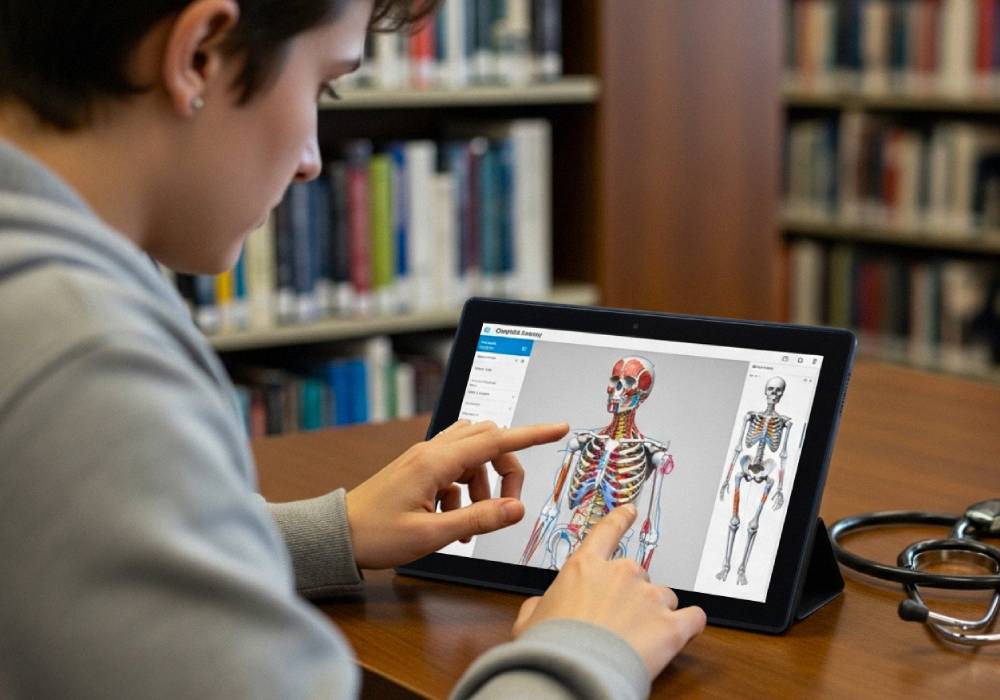
The Fusion5 Tablet can run advanced anatomy apps like Complete Anatomy, Human Anatomy Atlas, and BioDigital Human. These apps allow medical students to rotate, zoom, and dissect 3D models of the human body in detail. Whether you’re studying bones, muscles, organs, or blood vessels, the tablet offers a hands-on, visual way to understand human anatomy.
Interactive Medical Simulations
With the Fusion5 Tablet, you can run interactive medical simulations, such as patient assessment apps and clinical scenario walkthroughs. These tools help medical students practice decision-making and build clinical confidence in a safe, virtual environment.
Supports Augmented Reality Learning
Some medical training apps offer augmented reality features that project anatomy models into your physical space through the tablet’s camera. This makes learning more immersive and helps students visualize anatomical structures in 3D during hands-on sessions.
Portable and Classroom-Friendly
The Fusion5 Tablet is lightweight and easy to carry to lectures, labs, and study groups. It’s perfect for on-the-go learning, whether you’re revising anatomy on your commute or collaborating with classmates in clinical skills workshops.
Real-Time Collaboration for Medical Students
You can use video conferencing apps and collaborative tools to review cases, share screens, and discuss patient simulations with peers and instructors. The tablet supports file sharing and cloud-based platforms that make it easy to work on group assignments and clinical projects.
Why the Fusion5 Tablet Works for Medical Training
- Supports 3D anatomy and medical simulation apps
- Runs patient assessment and clinical scenario tools
- Lightweight, portable, and perfect for medical students
- Supports augmented reality learning experiences
- Compatible with cloud-based collaboration tools for group study
Fusion5 Tablet vs. Traditional Medical Tools
| Feature | Fusion5 Tablet | Printed Anatomy Books | Desktop Computer |
|---|---|---|---|
| 3D Anatomy Interaction | Yes | No | Yes |
| Medical Simulation Access | Yes | No | Yes |
| Portability | High | High | Low |
| Augmented Reality Support | Yes | No | Limited |
| Real-Time Collaboration | Easy | Manual | Moderate |
Why the Fusion5 10.1" Windows Tablet Is Perfect for Medical Training
- Supports medical simulations, 3D anatomy, and clinical learning apps
- Lightweight and portable for medical classrooms, labs, and study groups
- Smooth, detailed display for visualizing complex anatomy
- Adjustable screen for easy anatomy exploration in different learning environments
- Perfect tablet for medical students, healthcare trainees, and educators
If you’re ready to upgrade your medical training with interactive simulations and 3D anatomy on the go, the Fusion5 10.1" Windows 11 Professional Tablet PC is your trusted medical learning partner.
Explore more at Fusion5Store.com and enhance your clinical education.