


Can Fusion5’s Windows Tablets Redefine Cost Efficiency and Connectivity Across Today’s College Campuses?
Affordable, reliable, and compatible — how modern universities are using enterprise-ready tablets to streamline campus operations from libraries to wellness centers.
Across the country, colleges and universities are rethinking how they use technology to create better student experiences while keeping costs under control. IT leaders are trying to find solutions that don’t just work in the classroom but across every part of campus life.
Hybrid learning, digital check-ins, online student services, and interactive kiosks are now part of everyday campus operations. The challenge is finding devices that are powerful, affordable, and compatible with the systems schools already rely on, like Blackboard and Canvas.
This is where Windows 11 Pro tablets, such as the Fusion5 FWIN232 PRO N5, are starting to play a major role. They offer reliable performance, flexibility, and compatibility that make them practical for every department on campus.
Full Blog: How Fusion5 Tablets Are Powering Affordable Innovation Across College Campuses
The New Meaning of Cost Efficiency in Higher Education
Budgets in higher education are getting increasingly leaner. Whether you're a small community college or a sprawling state university, every purchase needs to prove its worth over long-term use. IT teams now evaluate the technology they use based on the total cost of ownership, rather than just the sticker price.
Teams are now more than ever, thinking beyond the initial purchase and trying to answer: How long will this device really last? How simple is it to support (warranty)? Can it actually deliver on versatile uses across different parts of the campus?
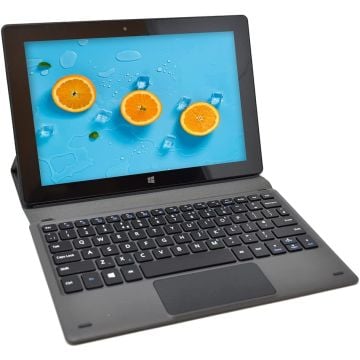
The Fusion5 FWIN232 PRO N5 answers these questions by combining 12GB of RAM, a 512GB SSD, and Intel’s 13th Generation processor in a compact 10.1-inch form. With Windows 11 Pro, it integrates smoothly with existing systems and supports enterprise-level management tools.
Because Fusion5 tablets are proudly assembled in Florida, universities can benefit from faster delivery times, reliable customer support and coverage, and easier bulk procurement, all of which help to control operational costs.
How Tablets Fit Into Campus Life
What makes these tablets truly appealing is their ability to adapt. A single device can serve as a teaching tool in one department, a check-in kiosk for campus services such as wellness centers, and research stations with docked tablets set up in libraries. Below are some examples of how universities use tablets diversely throughout their campuses.
Library Information and Printing Stations:
In a busy school library, long lines at the student help desk or the printer station can slow everyone down. By strategically putting Fusion5 tablets in permanent docking stations throughout the space, libraries can turn them into self-service information centers.
Students can walk right up to a kiosk, search for the books they need for classes, reserve study rooms, or print important last-minute documents through the Wi-Fi-connected printers. Systems like Ex Libris Alma, Koha, or WorldShare Management Services integrate easily on a Windows 11 Pro device, allowing the tablet to function as an extension of the library’s existing university software.
This setup helps keep the congestion low in the hottest campus spots, and creates a smoother flow during peak midterms and finals study times.
Wellness Center and Counseling Check-Ins:
We’re seeing a lot of college campuses using tablets for check in at health and counseling appointments. When a student arrives at the department for their appointment, they can check in faster on a tablet rather than filling out paper forms or waiting for assistance.
The counselor receives a notification when the student is ready, and so then the process stays perfectly private, time efficient, and professional.
The Fusion5 tablet’s speed, secure software, and responsive touchscreen make it ideal for managing these check-ins and running systems such as Titanium Schedule, Point and Click Solutions, or Medicat. These handy tablets can even support telehealth meetings or administrative functions in the same space, helping student services teams manage multiple needs with one device.
Classroom and Hybrid Learning Environments:
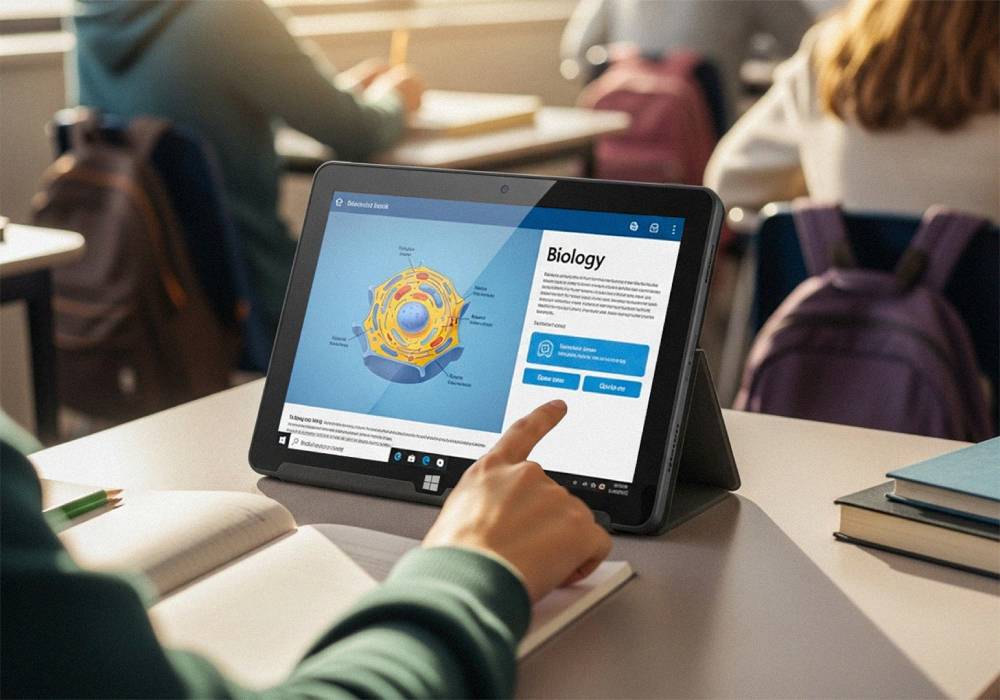
In classrooms and lecture halls, tablets give students and faculty full flexibility. Students can log right into their school’s primary Learning Management System to access their course materials, collaborate on projects, or submit last minute assignments.
Faculty can use the same devices for grading, managing daily attendance, or presenting course slides through Microsoft Teams, Zoom, or Office 365.
The Fusion5 FWIN232 PRO N5 is powerful enough to handle academic software like SPSS, MATLAB, or Adobe Creative Cloud apps, making it ideal for both teaching and research tasks. Its compact size and optional (recommended) keyboard docking station make it a lightweight alternative to the heavier, less space conscious laptops without sacrificing full functionality.
Campus Information and Wayfinding Kiosks:
Universities are investing in installing more and more interactive kiosks all around campuses to help students and visitors navigate all the facilities successfully, find info on the latest campus events happening, or access the campus services more conveniently. Mounted Fusion5 tablets can serve as information points that display maps, event calendars, or even timely emergency notifications.
Because these tablets run Windows 11 Pro, IT teams can customize the software, push updates remotely, and keep them connected to the campus network securely. This gives universities a flexible way to share information across multiple buildings without expensive signage systems.
Administrative Offices and Shared Workspaces:
Tablets are also becoming increasingly common in university administrative offices. When docked with a keyboard and mouse, the Fusion5 tablet can replace a traditional desktop computer while using the same productivity tools and management systems.
Staff can handle scheduling, communications, or budget tracking through Windows-based applications in a more mobile setup. For departments that rotate staff or share desks, a tablet-based workstation saves more space and adds a versatility of uses.
Building a More Connected Campus
A campus runs best when its technology connects seamlessly across all departments. When students, staff, and faculty use the same type of reliable device, everything from IT support to software updates becomes much easier to manage.
By using one versatile hardware platform, universities can standardize device imaging, simplify maintenance, and extend the life of their technology investments. The result is less downtime, fewer compatibility issues, and better access to digital tools, for everyone on campus grounds.
Why Fusion5 Fits the Higher Education Model
- Windows 11 Pro for full enterprise and education compatibility
- 12GB RAM + 512GB SSD for performance and multitasking
- 10.1-inch Full HD display for portability and clarity
- Assembled in the USA for faster shipping and support
- Two-year warranty with accidental damage coverage for peace of mind
These qualities make the Fusion5 FWIN232 PRO N5 a strong option for campuses looking to improve connectivity, reduce IT costs, and modernize services.
Final Thoughts
Technology should make campus life easier, not more complicated. Devices that can adapt to classrooms, libraries, wellness centers, and offices help universities build a more connected, student-focused environment.
If your goal is to modernize campus operations, simplify IT management, and give students easier access to learning, Fusion5 is the partner that can make it happen.
Explore our full range of Fusion5 Windows tablets, and take a deeper look into our newest Windows Pro N5 model that’s made right here in the USA. Built with care by a dedicated assembly team in Pasco County, Florida.