


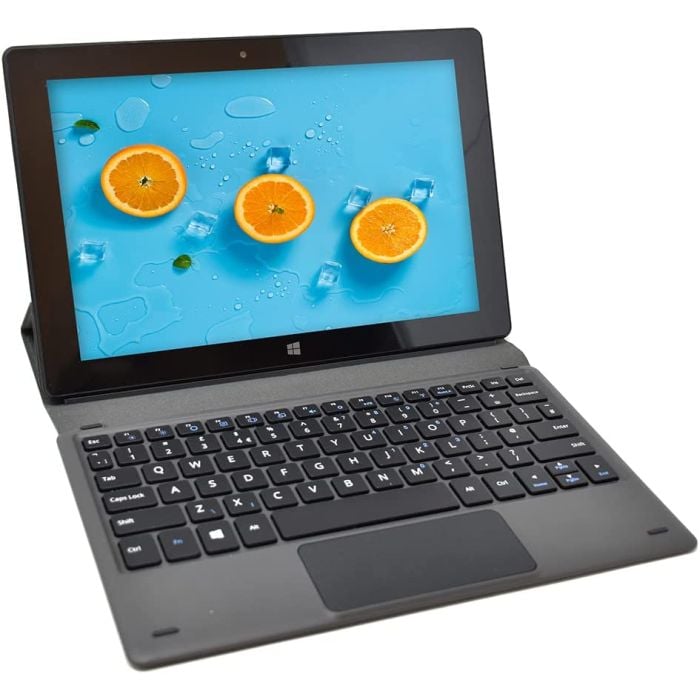
Fusion5 NOT Compatible with Rugged Tablets - Universal Docking Keyboard for 10.1" Windows Tablet Models - Convert Your Windows 11 Tablet into a Laptop PC for Enhanced Productivity, Slim & Stylish
 Trusted by 10,000+ customers
 29 units sold in the last 3 months
 Fusion5 S3 Docking Keyboard – Turn Your Tablet into a 2-in-1 Laptop
Compatible with Fusion5 models: FWIN232 PRO S3, PRO N4, PLUS FHD, PRO N5, PRO S1, and PRO NEO
This slim, travel-ready keyboard features a stable dock, plug-and-play setup, and standard QWERTY layout—perfect for work, typing, or streaming.
Includes a 6-month warranty. Not compatible with other models.
Out of stock
- SKU
- s3dk

UK & US Engineered
Built for reliability

Official UK Store
Trusted by thousands
Happy Customers
Loved across the World

Dedicated Support
UK-based team

16+ Years of Trust
Quality you can rely on
Why Customers Choose Fusion5

Reliable Power Delivery
Stable and efficient charging performance

Fast & Safe Charging
Built-in safety protection

Compact & Poratble
Lightweight and easy to carry

Official Fusion5 Compatibility
Designed for Fusion5 devices

Durable Build Quality
Strong and long-lasting

Great Everyday Value
Reliable at an affordable price
Turn your tablet into a laptop in seconds.
The Fusion5 Universal Docking Keyboard converts your 10.1" Windows 11 tablet into a slim, fully functional 2-in-1 laptop instantly — no drivers, no Bluetooth pairing, no separate charging needed. With a snug docking fit, built-in stand, and premium canvas case, it's the perfect travel-ready accessory for work, study, and everyday productivity on the move.
-

-
-
-
-
-

What's in the box
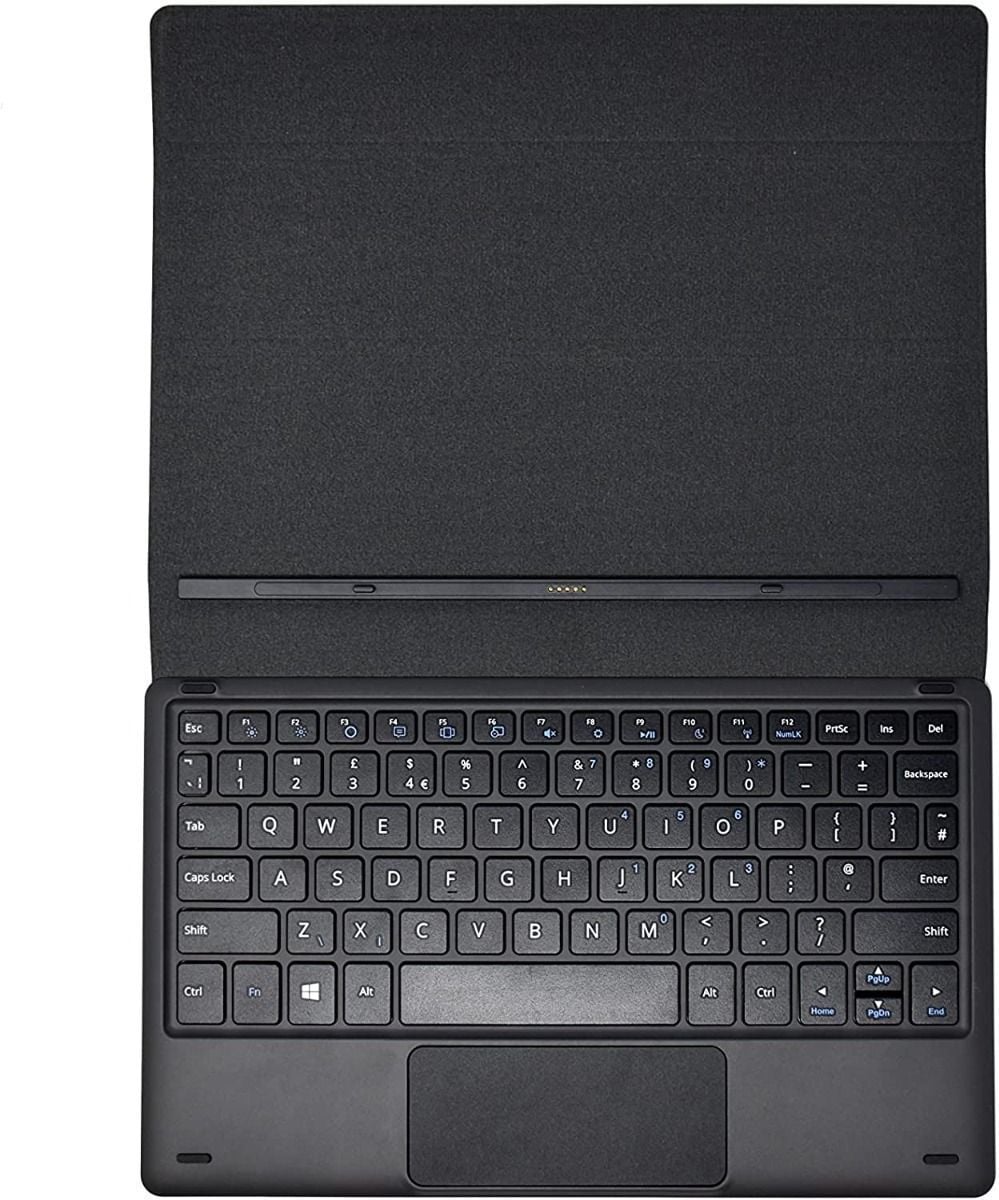
Docking Keyboard
User Manual & Guides
Warranty Card
Digital marketing emerged through internet-based platforms, helping businesses connect globally with customers.
| Hard-Drive Size | 512 GB |
|---|---|
| Operating System | Windows 11 Home |
| Other Special Features of the Product | Expandable Storage, Fast Charging, Stereo Speakers |
| Graphics Description | Integrated |
| Graphics Coprocessor | Intel UHD Graphics |
| Hard Disk Description | SSD |
| Warranty | 1 Year |
| Connectivity | WiFi, Bluetooth |
| USB Ports | 3 |
| Speaker Description | Built-in speakers |
Turn Your Tablet into a 2-in-1 Laptop
The Fusion5 S3 Docking Keyboard is designed to transform compatible Fusion5 Windows tablets into a slim and portable laptop-style setup within seconds. Featuring a stable docking system, plug-and-play convenience, and a premium travel-friendly design, it is the ideal accessory for productivity, work, entertainment, and everyday typing on the go.
Sleek & Travel-Friendly Design
Ultra-slim and lightweight, the Fusion5 S3 Docking Keyboard is designed for users who need portability without sacrificing functionality. Its clean and professional design fits naturally into office setups, coffee shops, classrooms, and travel environments.
Stable & Secure Docking Experience
The secure docking mechanism keeps your compatible Fusion5 tablet positioned comfortably for typing, browsing, video streaming, and productivity tasks. It creates a stable and ergonomic working angle for everyday use.
Plug-and-Play Simplicity
No drivers, software installation, Bluetooth pairing, or separate charging are required. Simply dock your compatible Fusion5 tablet into the keyboard and start working instantly with reliable wired connectivity.
Comfortable QWERTY Keyboard Layout
Featuring a standard US QWERTY keyboard layout, the Fusion5 S3 Docking Keyboard delivers a familiar and comfortable typing experience suitable for office work, emails, online classes, browsing, and everyday productivity tasks.
Compatible Fusion5 Tablet Models
Specifically engineered for selected Fusion5 Windows tablet models for reliable compatibility and secure docking support.
Important Compatibility Note
This docking keyboard is specifically designed for the compatible Fusion5 models listed above and is not suitable for other tablet models. If you are unsure about compatibility, Fusion5 customer support can help confirm the correct accessory for your device.
6-Month Fusion5 Warranty
Every Fusion5 S3 Docking Keyboard includes a 6-month warranty for added peace of mind and dependable customer support coverage.
Ideal For
Why Choose the Fusion5 S3 Docking Keyboard?
Combining secure docking, plug-and-play convenience, a comfortable QWERTY layout, lightweight portability, and reliable Fusion5 compatibility, the S3 Docking Keyboard is the perfect accessory for turning your compatible Windows tablet into a practical 2-in-1 productivity device.
Everything you need to get started is carefully packed inside the box for a smooth and premium out-of-the-box experience.
Docking Keyboard
This slim, travel-ready keyboard features a stable dock, plug-and-play setup, and standard QWERTY layout
User Manual
Quick start instructions and detailed guides to help you set up your device effortlessly and quickly.
Warranty Card
Official 12-month manufacturer warranty support for peace of mind and secure ownership.
Eligible for Return
New items purchased from Fusion5Store.com can be returned within 30 days if they are:
- • Dead on arrival
- • Arrived damaged
- • Unopened in original packaging
Return Conditions
Fusion5Store.com reserves the right to inspect all “dead on arrival” returns. A customer fee of up to 15% may apply if the condition of the product is misrepresented.
Computers that are damaged through customer misuse, missing parts, or customer tampering may incur higher restocking fees based on the condition of the returned product.
Returns are not accepted for desktop or notebook computers more than 30 days after shipment delivery.
Marketplace vendor products may follow separate return policies defined by the individual seller.
Product Warranty
Warranty coverage is provided directly by the manufacturer and may vary depending on the specific product and purchase terms.
Returns and warranty for marketplace products are handled according to our policies.
Need help with a return?
Contact Customer SupportThe Fusion5 Universal Docking Keyboard is compatible with all 10.1" Fusion5 Windows 11 tablet models except the Fusion5 Rugged Windows Tablet range. Rugged models use a different design and docking structure, so this keyboard will not fit or function correctly with them.





Turn your tablet into a laptop in seconds.
The Fusion5 Universal Docking Keyboard converts your 10.1" Windows 11 tablet into a slim, fully functional 2-in-1 laptop instantly — no drivers, no Bluetooth pairing, no separate charging needed. With a snug docking fit, built-in stand, and premium canvas case, it's the perfect travel-ready accessory for work, study, and everyday productivity on the move.
-
-
-
-
-
-
What's in the box
Docking Keyboard
User Manual & Guides
Warranty Card
Digital marketing emerged through internet-based platforms, helping businesses connect globally with customers.
| Hard-Drive Size | 512 GB |
|---|---|
| Operating System | Windows 11 Home |
| Other Special Features of the Product | Expandable Storage, Fast Charging, Stereo Speakers |
| Graphics Description | Integrated |
| Graphics Coprocessor | Intel UHD Graphics |
| Hard Disk Description | SSD |
| Warranty | 1 Year |
| Connectivity | WiFi, Bluetooth |
| USB Ports | 3 |
| Speaker Description | Built-in speakers |
Turn Your Tablet into a 2-in-1 Laptop
The Fusion5 S3 Docking Keyboard is designed to transform compatible Fusion5 Windows tablets into a slim and portable laptop-style setup within seconds. Featuring a stable docking system, plug-and-play convenience, and a premium travel-friendly design, it is the ideal accessory for productivity, work, entertainment, and everyday typing on the go.
Sleek & Travel-Friendly Design
Ultra-slim and lightweight, the Fusion5 S3 Docking Keyboard is designed for users who need portability without sacrificing functionality. Its clean and professional design fits naturally into office setups, coffee shops, classrooms, and travel environments.
Stable & Secure Docking Experience
The secure docking mechanism keeps your compatible Fusion5 tablet positioned comfortably for typing, browsing, video streaming, and productivity tasks. It creates a stable and ergonomic working angle for everyday use.
Plug-and-Play Simplicity
No drivers, software installation, Bluetooth pairing, or separate charging are required. Simply dock your compatible Fusion5 tablet into the keyboard and start working instantly with reliable wired connectivity.
Comfortable QWERTY Keyboard Layout
Featuring a standard US QWERTY keyboard layout, the Fusion5 S3 Docking Keyboard delivers a familiar and comfortable typing experience suitable for office work, emails, online classes, browsing, and everyday productivity tasks.
Compatible Fusion5 Tablet Models
Specifically engineered for selected Fusion5 Windows tablet models for reliable compatibility and secure docking support.
Important Compatibility Note
This docking keyboard is specifically designed for the compatible Fusion5 models listed above and is not suitable for other tablet models. If you are unsure about compatibility, Fusion5 customer support can help confirm the correct accessory for your device.
6-Month Fusion5 Warranty
Every Fusion5 S3 Docking Keyboard includes a 6-month warranty for added peace of mind and dependable customer support coverage.
Ideal For
Why Choose the Fusion5 S3 Docking Keyboard?
Combining secure docking, plug-and-play convenience, a comfortable QWERTY layout, lightweight portability, and reliable Fusion5 compatibility, the S3 Docking Keyboard is the perfect accessory for turning your compatible Windows tablet into a practical 2-in-1 productivity device.
Everything you need to get started is carefully packed inside the box for a smooth and premium out-of-the-box experience.
Docking Keyboard
This slim, travel-ready keyboard features a stable dock, plug-and-play setup, and standard QWERTY layout
User Manual
Quick start instructions and detailed guides to help you set up your device effortlessly and quickly.
Warranty Card
Official 12-month manufacturer warranty support for peace of mind and secure ownership.
Eligible for Return
New items purchased from Fusion5Store.com can be returned within 30 days if they are:
- • Dead on arrival
- • Arrived damaged
- • Unopened in original packaging
Return Conditions
Fusion5Store.com reserves the right to inspect all “dead on arrival” returns. A customer fee of up to 15% may apply if the condition of the product is misrepresented.
Computers that are damaged through customer misuse, missing parts, or customer tampering may incur higher restocking fees based on the condition of the returned product.
Returns are not accepted for desktop or notebook computers more than 30 days after shipment delivery.
Marketplace vendor products may follow separate return policies defined by the individual seller.
Product Warranty
Warranty coverage is provided directly by the manufacturer and may vary depending on the specific product and purchase terms.
Returns and warranty for marketplace products are handled according to our policies.
Need help with a return?
Contact Customer SupportThe Fusion5 Universal Docking Keyboard is compatible with all 10.1" Fusion5 Windows 11 tablet models except the Fusion5 Rugged Windows Tablet range. Rugged models use a different design and docking structure, so this keyboard will not fit or function correctly with them.
Customer Reviews
Buyer Ratings
Trusted by 10,000+ customers
Review this product
Share your thoughts with other customers spots
Sara Harrison
Nigel Hansen
Martin C.
BugPowderDust
Amazon Customer
Autumn Collins
Maggie Allen
Pablo Perez Diaz
Xanthe Bauer
spots
Sara Harrison
Nigel Hansen
Martin C.
BugPowderDust
Amazon Customer
Autumn Collins
Maggie Allen
Pablo Perez Diaz
Xanthe Bauer
