How Windows Tablets Help You Manage Indoor Farming Projects
For many indoor farmers, their journey into growing begins small. Maybe it’s a few herbs on a sunny windowsill or a tray of lettuce seedlings on a table. They might think that growing indoors is limited to these types of setups. However, there are many different configurations and potential for growth that far exceed these humble beginnings.
Whether it be herbs on your kitchen counter, a hydroponic system sitting on a bookshelf in a store, or simply growing something at home rather than buying it at a store.
This is big, but there's a bigger shift going on too.
There is a growing interest in the production of food, a desire to have more control over the food supply, and practical solutions to making healthy changes.
This emerging trend is showing up in many locations across the country in both Indoor commercial farming as well as simpler Indoor home operations.
In this blog we will explore how indoor farming works. Then we’ll look at how sensors and data help to optimise it. Finally we’ll see how a Windows tablet can help you to manage complex real world systems.
Full Blog: Using a Windows Tablet to Track and Improve Indoor Farming at Scale and at Home
What indoor farming is and how sensors are being used
Indoor farming is a method of growing plants in a controlled environment instead of relying on outdoor conditions.
This includes setups like greenhouses, vertical farms, hydroponic systems, and smaller home growing spaces.
Instead of depending on the weather, everything is controlled. Light cycles are adjusted manually, water is measured, nutrients are managed, and temperature and humidity are kept within specific ranges.
Because of this, indoor farming is more predictable, but it also requires much closer attention to detail throughout the growing process.
This is where sensors come in.
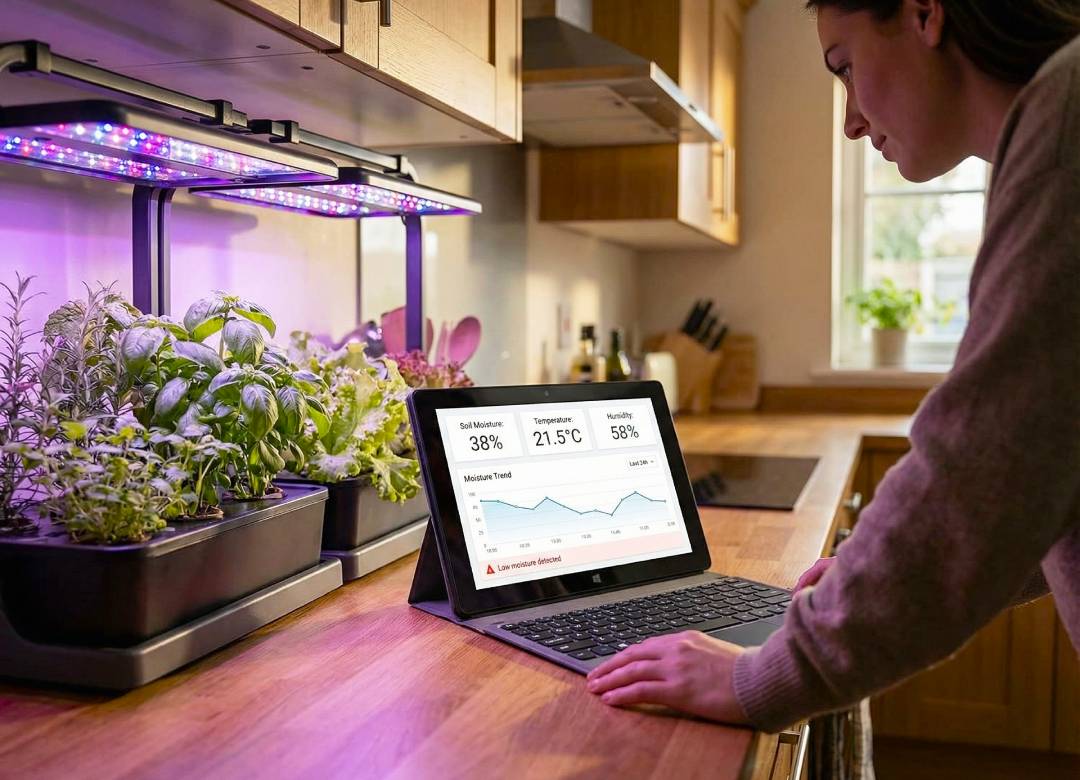
Modern indoor farming systems can track soil moisture, air temperature, humidity, light exposure, and nutrient levels. These sensors collect data continuously and send it to dashboards where growers can see what is happening in real time.
As explained in this HortiDaily article on wireless sensors in indoor farming, this kind of monitoring is already being used to improve irrigation timing, reduce resource waste, and create more consistent growing conditions.
Having sensors in place is helpful, but it doesn’t automatically make a system easier to manage. The real advantage comes when that information can be viewed quickly, understood clearly, and used while someone is actively working in the space rather than later from a separate control point.
A common issue with sensor-based setups is that the readings are technically available, but not always in a way that is easy to review at the exact moment a decision needs to be made.
How Windows tablets support large-scale indoor farming operations
In commercial indoor farming environments, most of the technology is already in place.
Facilities are often running sensor networks, climate control systems, irrigation automation, and monitoring dashboards at the same time. The difficulty is not whether the systems exist, but how easily people can interact with them while they are doing their work.
A common issue growers run into is noticing a change in the growing space before they have an easy way to confirm it in the system. Something might look slightly off in one zone, but if the readings are only being checked from a fixed workstation, it takes longer to compare the numbers, confirm the issue, and decide what needs to be adjusted.
That gap between observation and confirmation can slow down how quickly decisions are made.
A Windows tablet helps close that gap.
Because it runs full Windows, it can access the same systems used on desktop machines. Many of the platforms used in indoor farming today are built around browser dashboards or desktop-style interfaces.
For example, Priva Operator allows growers to view greenhouse data, system status, and environmental conditions in real time from different devices, not just fixed computers.
This changes how the work happens on a practical level.
Instead of walking away from the growing area to check information, a grower can stay in the same space and:
- check live sensor readings for that specific zone
- compare conditions between different areas
- review alerts as they appear
- open reports or logs without interrupting the task they’re already doing
This makes it easier to confirm what is happening and take action while the situation is still fresh, rather than trying to remember details later.
It also improves communication between team members, because information can be shown directly in the space where the work is happening.
The tablet does not replace the main systems.
It simply makes them easier to use in a way that fits how the work is actually carried out.
How Windows tablets help individuals manage home indoor farming
At home, the setup is smaller, but the same pattern still appears.
Most people begin with something simple. They use a countertop kit, a few grow lights, or a small shelf system, and they rely on memory or a loose routine to keep things going.
That works in the early stages.
A common issue people run into at home is that after a few weeks, they are no longer completely sure what changed and when. They may have adjusted the light, watered on a different day, or moved one plant to a new spot, but without writing it down properly, it becomes difficult to connect those changes to the results they are seeing.
A Windows tablet helps bring structure into that process.
Instead of keeping everything in separate places or relying on memory, you can manage it all in one place. A simple setup might involve using Excel to log watering schedules, changes in nutrients, or adjustments to light exposure, while also storing photos to compare plant growth over time.
This makes it easier to look back and understand what actually led to a result.
If someone wants to take it further, sensors can be added to a home setup.
There are now smaller and more accessible devices that can measure moisture, temperature, and light levels. These can connect to dashboards that show live data in a clear format.
A Windows tablet can be used to access that information without needing multiple devices.
For example, tools like Home Assistant allow users to create dashboards that bring together data from different sensors into one place.
What makes this more useful in practice is that the setup stops depending entirely on memory or guesswork. Once the readings are visible in one place, it becomes much easier to compare what the plant is doing with what the environment is doing and make small adjustments before a problem builds up.
How this connects to sustainability and self-sufficiency
Indoor farming is not just about growing plants.
For some, recycling will be one of a number of new experiences that they are trying to get to grips with. For others it’ll be part of a wider trend of increasing awareness of systems and the control they have over those systems.
There’s been a growing interest in recent years in reducing waste, using more local systems and relying less on the long supply chain, and adopting genuinely sustainable habits for the long term.
Indoor farming fits into that because it gives people a way to take small, manageable steps in that direction.
A simple setup can help someone grow herbs or vegetables more consistently, but the value comes from being able to maintain that consistency over time.
What often makes a small indoor growing setup feel inconsistent is not always the growing kit itself, but the fact that small changes are easy to miss when nothing is being tracked properly. When watering, light exposure, or environmental conditions are not being reviewed in one place, it becomes much harder to repeat what worked well.
A Windows tablet is really helpful because it gives you a space to keep all your information in one place, look over any changes you've made, and link everything together in a way that's simple to understand. This makes it easy to stay on top of things and see how everything fits together.
Why the Fusion5 Pro N5 is a practical option for this
For this type of use, the goal is not to have the most powerful device available.
It’s to have something that is capable, reliable, and easy to use in different situations.
The Fusion5 Pro N5 fits well into that role.
Because it runs Windows 11 Pro, it can handle the same types of tools used in indoor farming setups, including browser-based dashboards, spreadsheets, and tracking systems.
This matters because many indoor farming platforms are designed to run through web interfaces or desktop-style environments rather than simple mobile apps.
The Pro N5 allows you to:
- open sensor dashboards in a browser
- track data using spreadsheets
- store notes and images in one place
- switch between tasks without needing separate devices
With its Intel N100 processor, 12GB RAM, and SSD storage, it has more than enough performance for these tasks.
Portability also plays an important role.
It can be carried around a growing space, placed nearby while you’re working, or used with a docking keyboard when you want to enter more detailed information.
This makes it practical for both:
- commercial environments where work happens across different areas
- home setups where simplicity and organisation matter
Making those systems easier to access means they can be used more naturally throughout the day without interrupting the work that’s already being done.
Final thoughts
Indoor farming is increasing in popularity across all user types.
Technology has advanced significantly in recent years and continues to evolve when it comes to sensors and monitoring systems.
Information that isn’t readily available or dispersed throughout several locations can make it more problematic to maintain consistency.
Want it all? Get a Windows tablet to bring it all together.
These devices enable you to check data, monitor changes, save updates, and manage settings while working in any location you need to be.
Whether you’re running a commercial growing environment or a couple of plants at home, monitoring and controlling can help you to improve your techniques.
If you’re looking to make your indoor farming setup more consistent and easier to manage, having the right tools in place is a practical step forward. Check out our range of Windows tablets today.