Stop Losing Stockroom Time: Best Tablet for Retail Distribution Teams
The duties carried out in retail distribution are not only about moving boxes from one place to another. The stockroom employees might have to undertake a variety of activities including auditing inventory, confirming SKU numbers, processing shipments and deliveries, among others before the product even hits the sales floor.
With all this done using paper worksheets, computers in the office, handheld scanners, and separate emails, then things can be quite difficult to coordinate. Having a tablet for retail distribution will help facilitate stockroom audits, barcode processes, and even reporting processes on the back end.
A Windows tablet like the Fusion5 Pro N5 is an excellent choice for facilitating retail operations through familiar software, portal websites, spreadsheet analysis, inventory management software, and barcode scanning capabilities.
Quick Points: Why Retail Distribution Teams Use Tablets
- Stockroom Audits: Count products, check shelves, compare on-hand quantities, and record inventory discrepancies.
- Barcode Workflows: Use compatible barcode scanners or software to help identify SKUs, UPCs, cartons, and stock locations.
- Back-of-House Reporting: Review spreadsheets, update forms, and prepare reports without waiting for an office computer.
- Windows Compatibility: Access familiar retail software, POS exports, ERP systems, WMS tools, PDFs, and web-based dashboards.
- Team Mobility: Move between receiving areas, stockrooms, back offices, and sales floor storage areas with one compact device.
Full Blog: How a Tablet for Retail Distribution Supports Stockroom Audits, Barcode Workflows, and Back-of-House Reporting
Why Stockroom Work Gets Disorganized
Retail stockrooms can get busy fast with deliveries, replenishment, pickup orders, damaged stock, and stock transfers happening at the same time. When inventory counts are written on paper and entered later, SKU quantities, damage notes, or stock locations can be missed.
NetSuite explains that inventory accuracy depends on how closely recorded inventory matches the actual physical count, and that manual counts, data-entry errors, damaged goods, misplaced inventory, and disorganized receiving can create discrepancies.
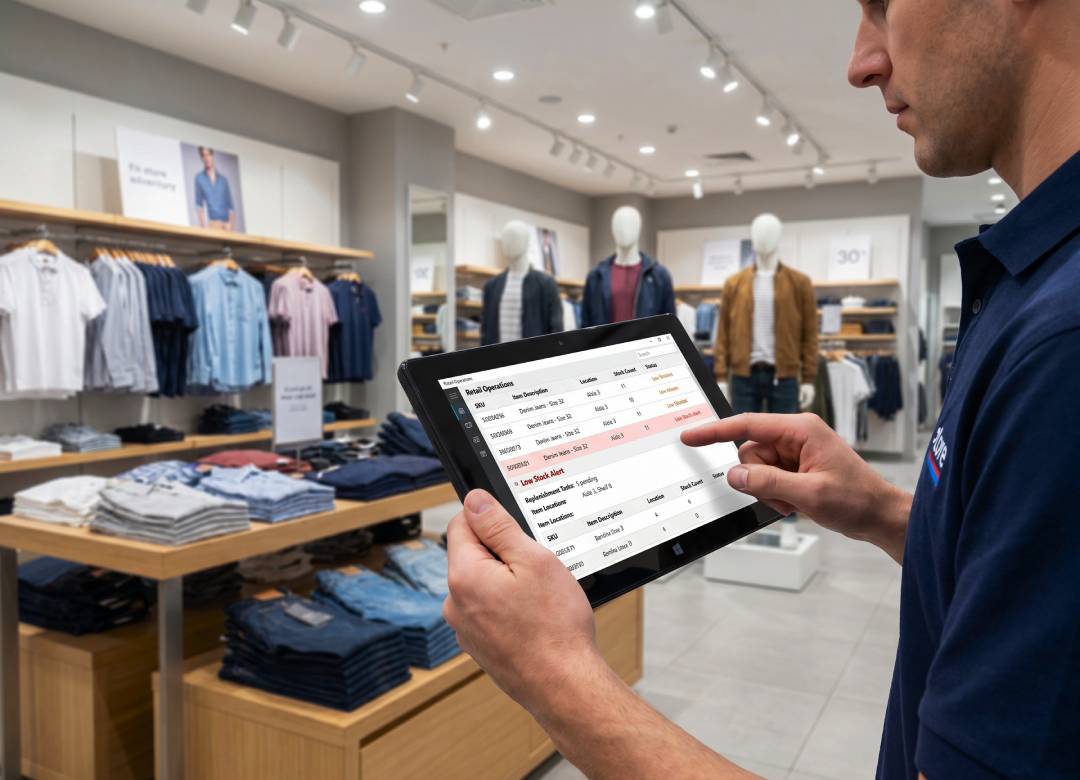
A stockroom audit tablet helps employees check inventory while they’re still in front of the product. Staff can confirm SKU quantities, compare them against the system, flag missing items, and note damaged packaging on the spot. This can support cycle counts, stocktakes, stock transfers, and backroom inventory checks without replacing the company’s existing inventory process.
Barcode Workflows for Faster Item Checks
Barcode processes are important in retail distribution since they help identify goods faster and reduce manual data input. A barcode workflow tablet can be used to scan UPC codes, check product labels, validate carton details, and cross-reference goods with inventory records through compatible scanner devices or barcode applications.
In a stockroom environment, it can be helpful during the receiving of new goods, checking stock placement, dealing with returns, and preparing inventory for replenishment. Rather than manually keying in lengthy item IDs onto a desktop later on, employees can view product details and input data into relevant systems while standing near the merchandise.
For retail teams managing hundreds or even thousands of SKUs, it can be useful in minimizing confusion between similar goods, sizes, colors, styles, or packaging types.
Better Back-of-House Reporting
Back-of-house reporting is important because managers need to know what’s actually happening behind the sales floor. This may include low-stock items, overstocked products, damaged goods, missing units, transfer issues, and receiving delays.
A back of house tablet can help employees open spreadsheets, fill out digital forms, review PDFs, update shared files, and access compatible retail portals. This gives supervisors clearer information from the stockroom instead of waiting for handwritten notes or verbal updates at the end of the shift.
For businesses that manage BOPIS, click-and-collect, ship-from-store, or local delivery workflows, better inventory visibility can also help staff locate items faster and reduce the chance of promising products that aren’t actually available.
Where the Fusion5 PRO N5 Fits
For retail distribution teams out there, the Fusion5 Pro N5 is a practical choice due to its small size and operating system. It comes with Windows 11 Professional and an Intel 13th Gen Alder Lake N100 processor, allowing teams to use familiar business software, web portals, spreadsheet applications, and compatible inventory management programs.
Furthermore, the 10.1-inch Full HD IPS touchscreen allows workers to view necessary item lists, fill out needed forms, review product details, and check reports without carrying a traditional laptop from one place to another.
In addition, with 12GB of RAM and the option of choosing between 256GB or 512GB SSD storage, the Fusion5 PRO N5 can perform common tasks related to retail business, including spreadsheets, web portals, email, inventory files, and report review. The MicroSD slot also supports expanded storage up to 512GB.
Dual-band Wi-Fi helps teams connect to compatible cloud systems, access required web portals, and share files when network access is available.
Lastly, with Bluetooth, they can use compatible accessories such as barcode scanners, keyboards, headsets, or other business devices.
Practical Use Cases for Retail Teams
Some examples of retail distribution processes that the Pro N5 can support include conducting stockroom audits, barcode cycle counts, delivery verification, product search, backroom reports, and manager reviews. An employee can move through a stockroom aisle, confirm SKU quantities, scan compatible barcodes, check a spreadsheet, and update a report without having to go back to their desk every time.
In addition, the device can assist with receiving processes where employees can cross-check incoming cartons with purchase orders or delivery notes. If any products are damaged, the dual Full HD cameras can be used for taking photos when needed.
Why It Works for Retail Operations
Retail distribution teams don't have to use big bulky laptops for the back-of-house operations. They would do better with something portable that can run real business software, be easy to carry around the stockroom, and keep all important information accessible at the same time.
The Fusion5 Pro N5 is assembled in Pasco County, Florida, USA, with a 2-year warranty that includes accidental damage coverage. For retailers looking for a low-cost Windows tablet for stock audit operations, barcode workflows, and back-of-house reporting, it provides a practical balance of portability, performance, and business usability.
FAQ
What is a tablet for retail distribution used for?
It can be used for stockroom audits, SKU checks, barcode workflows, inventory reports, digital forms, spreadsheets, receiving notes, and back-of-house reporting.
Can the Fusion5 PRO N5 work with barcode scanners?
Yes, it can work with compatible barcode scanners or barcode software through supported connections such as Bluetooth, USB, or Windows-compatible applications.
Is a Windows tablet useful for stockroom audits?
Yes. A Windows tablet lets retail teams access spreadsheets, inventory files, reports, and compatible retail systems while working in the stockroom.
Is the PRO N5 a good option for back-of-house teams?
Yes. The PRO N5 is a practical option for retail teams that need a portable Windows 11 Pro tablet for stockroom checks, reporting, and everyday business workflows.