How Forklift-Mounted Rugged Tablets Improve Warehouse Operations
Warehouse operations have become increasingly dependent on speed, accuracy, and real-time data. Forklift operators are no longer just moving goods, they’re part of a connected workflow that relies on inventory systems, scanning tools, and digital task management.
When these processes rely on paper sheets or disconnected systems, delays and errors become common. A rugged Windows tablet mounted directly on a forklift changes how these tasks are handled, turning each vehicle into a mobile workstation that improves efficiency across the operation.
Quick Sum Up
- Turn forklifts into mobile data hubs with mounted tablets
- Access inventory systems and tasks in real time
- Reduce errors from manual processes and paperwork
- Improve operator efficiency and workflow visibility
Full Blog: Best Rugged Windows Tablet Uses for Forklift Operators
Why Digital Tools Matter for Forklift Operators
Modern warehouses rely heavily on real-time information. Operators need to know where items are located, what needs to be moved next, and how tasks are prioritised. Without direct access to systems, this often means stopping to check terminals, reading printed pick lists, or relying on radio communication.
Industry guidance from MHI notes that warehouse management software can help improve inventory management, reduce labor costs, and support operational goals, which is why real-time access to these systems matters for forklift operators.
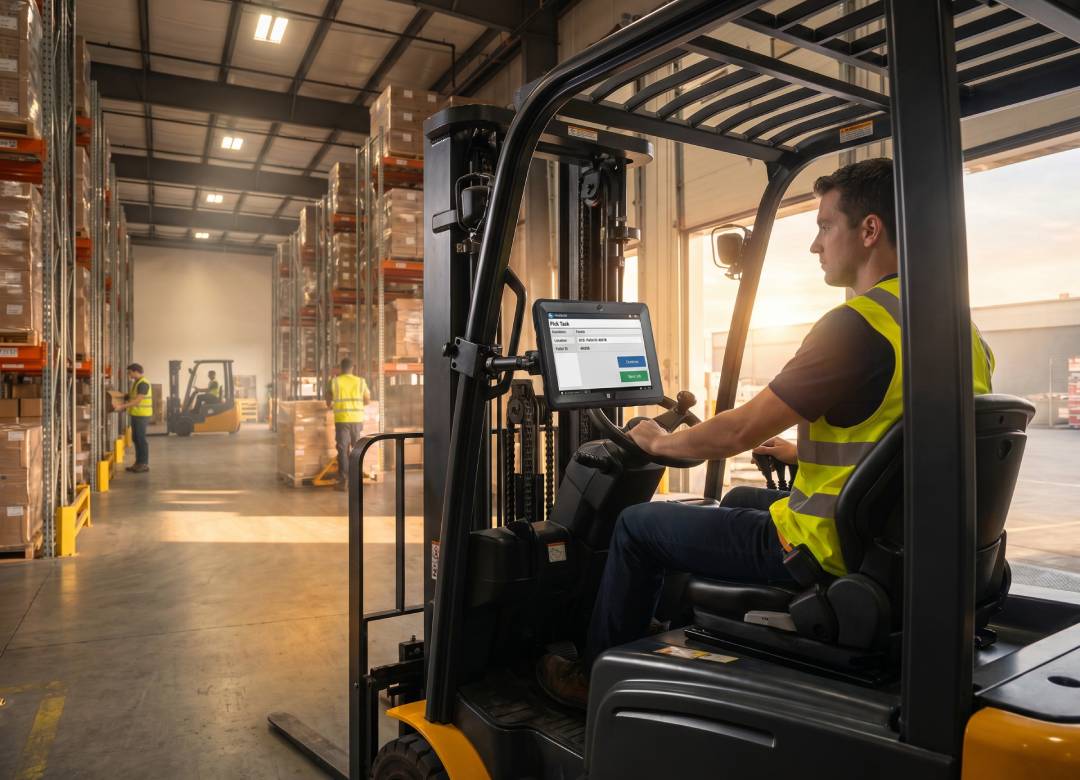
A rugged tablet mounted on a forklift allows operators to access warehouse management systems (WMS), inventory data, and task lists instantly. Instead of moving between locations to check information, everything is available directly in front of them.
This shift reduces downtime between tasks and keeps workflows continuous. Operators can move from one job to the next without interruption, which has a direct impact on overall productivity.
Mounting a Tablet on a Forklift: Is It Practical?
Yes, and it is already common in many warehouse environments.
Rugged tablets are often mounted using:
- RAM mounts or industrial mounting brackets
- Clamp systems attached to forklift frames
- Adjustable arms for flexible viewing angles
These arrangements help ensure that the tablet remains stable and easily visible throughout its use. Stability and visibility play major roles, as the operator should be able to take a quick glance at the screen without being distracted from their surroundings.
The Fusion5 Rugged Windows tablet can work well under these conditions since it is designed to withstand movement, vibration, and regular wear and tear in busy warehouse environments.
Real-Time Inventory Access on the Move
One of the most valuable uses of a forklift-mounted tablet is direct access to inventory systems.
Instead of:
- Checking stock at a stationary terminal
- Printing pick lists
- Returning to confirm item locations
Operators can:
- View live inventory levels
- Confirm bin locations instantly
- Update stock movements in real time
This reduces errors caused by outdated information and removes unnecessary steps in the workflow.
For example, if an item location changes or stock is updated, the operator sees it immediately. There is no lag between system updates and execution.
Faster Picking and Putaway Processes
Forklift operators are often involved in:
- Pallet picking
- Putaway tasks
- Replenishment
With a mounted tablet, these tasks become more streamlined.
Instead of working from printed instructions, operators can follow digital task lists that update dynamically. The system can:
- Assign the next task automatically
- Show optimal routes through the warehouse
- Reduce travel time between locations
This is especially important in large warehouses where inefficient movement can add up quickly.
By guiding operators visually and updating tasks in real time, the tablet helps maintain a steady workflow without unnecessary delays.
Barcode Scanning and Data Input
Many warehouse operations rely on barcode scanning for accuracy.
A rugged Windows tablet can support:
- Bluetooth barcode scanners
- USB-connected scanning devices
- Camera-based scanning when needed
This allows operators to:
- Scan items directly from the forklift
- Confirm picks instantly
- Update inventory without leaving the vehicle
Reducing the need to step off the forklift not only improves efficiency but also helps maintain safety and consistency in operations.
Improving Communication Across the Warehouse
Communication is another area where mounted tablets make a difference.
Instead of relying solely on radios or verbal instructions, operators can receive:
- Task updates
- Priority changes
- Alerts from management systems
This keeps everyone aligned without interrupting workflows.
For example, if a high-priority shipment needs to be processed, the system can push that task directly to the operator’s screen. There is no need for back-and-forth communication or delays in relaying instructions.
Why the Fusion5 Rugged Tablet Fits Forklift Use
To support this type of environment, the device needs to handle more than just basic tasks.
The Fusion5 rugged Windows tablet is designed for:
- Shock resistance and durability in industrial environments
- 12GB RAM and SSD storage for smooth multitasking
- Windows 11 Pro compatibility with warehouse systems
- Bright display (up to 500 nits) for visibility in varied lighting
This combination makes it suitable for:
- Long shifts
- Constant movement
- Multi-application workflows
Its ability to run full Windows software is also important. Many warehouse systems are built for desktop environments, and a Windows tablet allows full compatibility without needing workarounds.
Supporting More Than Just Forklift Tasks
While the primary use may be mounted operation, the same tablet can be used off the forklift when needed.
Supervisors or operators can:
- Carry the device for inspections
- Use it for reporting or documentation
- Access systems anywhere in the warehouse
This flexibility reduces the need for multiple devices and keeps operations more streamlined.
Where This Makes a Real Difference
The impact of adding a rugged tablet to forklift operations is noticeable in several ways.
Without it:
- Tasks rely on memory or printed instructions
- Operators move back and forth to check systems
- Delays and errors are more common
With it:
- Information is immediate and visual
- Tasks flow continuously
- Operators stay focused on movement and execution
Over time, these improvements lead to:
- Faster order processing
- Fewer picking errors
- Better use of labour
Conclusion: Turning Forklifts into Smart Workstations
Forklifts are already central to warehouse operations. By adding a rugged Windows tablet, they become more than just transport tools, they become connected workstations.
This shift allows operators to work more efficiently, access information instantly, and complete tasks without interruption.
The Fusion5 rugged tablet supports this by combining durability, performance, and compatibility with existing systems. For businesses looking to improve workflow speed and accuracy, it offers a practical way to modernise forklift operations without adding unnecessary complexity.
FAQ
Can a rugged tablet be mounted on a forklift?
Yes, rugged tablets can be securely mounted using industrial mounts designed for forklifts, allowing safe and stable use during operation.
Is it safe to use a tablet while operating a forklift?
When properly mounted and used for quick reference, tablets are commonly integrated into workflows without disrupting safe operation.
What systems can a Windows tablet run in a warehouse?
A Windows tablet can run warehouse management systems (WMS), inventory platforms, and standard business applications.
Does it replace existing warehouse systems?
No, it works alongside them by providing direct access at the point of operation.